Marker Tag: A Cool Display Font for Handmade Products
I was standing at my worktable, a fresh batch of soy wax candles cooling on the rack, when I realized something was missing. The jars looked beautiful with their creamy wax and simple cotton wicks, but the plain kraft labels I’d printed earlier felt flat. I wanted a typeface that could carry the same effortless, street-inspired energy I pour into my scents—something with texture, grit, and a little swagger. That’s when I discovered Marker Tag, a brushed and street styled display font that instantly gave my labels a whole new personality.
If you’re a maker, a printable creator, or a small shop owner who loves to see your branding come alive on real products, you know how much a single font choice can shift the entire feel of a design. Marker Tag isn’t just another typeface; it’s a creative tool that feels like it was made for hands-on projects. In this article, I’ll walk you through how this font can transform labels, stickers, cards, and more—giving your work a fresh, modern edge that customers notice right away.
What Makes Marker Tag Feel So Special?
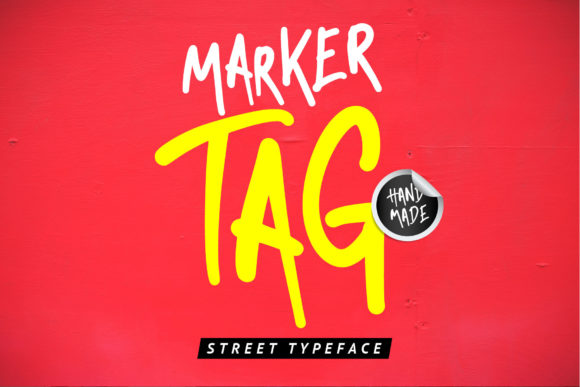
At first glance, Marker Tag catches your eye with its raw, brushed texture. The letters look like they were drawn quickly with a broad marker on a slightly textured surface—there’s a subtle roughness, a few intentional gaps, and a sense of movement that feels both energetic and approachable. It’s a display font through and through, meant to be seen at larger sizes where those details can shine.
The mood is casual and confident, with a street-style vibe that reminds me of hand-painted signs, boutique window displays, and limited-edition apparel drops. Yet it’s not so aggressive that it alienates softer handmade goods. When I test printed the words “cozy vanilla” on a candle label using Marker Tag, the font added a cool, urban layer to the rustic charm of the jar—it was a perfect balance of warm and edgy.
I often describe the style as “effortless cool.” The letterforms have a slight slant and varied stroke widths that give the appearance of a custom, hand-lettered look without the hours of practice. For printable creators and Etsy sellers, this means you can quickly produce designs that feel highly personal and professionally crafted, all while keeping the production time realistic.
From Candle Labels to Wedding Signage: Real Ways to Use Marker Tag
One of the first things I did after falling for this font was to create a full line of candle labels. I used Marker Tag for the scent name—“Midnight Fig,” “Salt & Smoke,” “Amber + Moss”—and paired it with a clean sans serif for the smaller ingredient details. The result was a label that stood out on a shelf, even from a distance, because the display font carried the visual weight effortlessly.
But candles are just the beginning. Here are some of the hands-on projects where Marker Tag truly shines:
- Greeting cards and invitations: I designed a set of birthday cards using the font for the main message, like “let’s party” or “another year older.” The brushed texture gave the cards a handcrafted feel that matched the kraft paper perfectly.
- Wedding stationery: For a couple’s welcome board, I used Marker Tag to spell out their names and the date. It added a modern, slightly rustic touch that photographed beautifully against a floral backdrop.
- Printable wall art: I created a digital download with a single bold word—“breathe,” “gather,” “roam”—set in this font, layered over a muted watercolor background. The contrast between the gritty type and the soft art was striking.
- Sticker sheets and product tags: Small die-cut stickers with short phrases like “handmade with love” or “keep it real” became instant favorites in my shop. The font scaled well to sticker size, and the texture held up even when printed on matte vinyl.
- Apparel and tote bags: Using heat transfer vinyl, I cut a few test designs with my Cricut. The street styled look of Marker Tag was right at home on tote bags and unisex tees, giving them a boutique, small-batch vibe.
- Seasonal craft designs: For holiday tags and market packaging, I used the font to write “joy,” “merry,” and “thankful” on gift tags and small boxes. It added a cozy, handmade character that felt personal and unexpected.
In every case, I found that Marker Tag works best for short phrases, names, titles, or decorative wording. It’s a display font, so it’s not meant for long paragraphs or dense body text. Instead, use it where you want to grab attention—headlines, product names, or that one key word that defines the whole design.
How a Font Can Change the Way Your Products Feel
When a customer picks up a handmade candle or a set of greeting cards, they’re not just buying the physical item; they’re responding to the mood you’ve created. The typography you choose plays a huge role in that emotional connection. Marker Tag brings a sense of authenticity and street-smart confidence that can elevate the perceived quality of your work.
I noticed that the same candle label design, when set in a generic serif font, felt traditional and a bit forgettable. But with Marker Tag, the label suddenly hinted at a story—maybe a small batch maker in a city studio, or a brand that values artistry over mass production. That kind of subtle storytelling is what builds brand consistency and recognition over time, especially when you use the same font across your packaging, signage, and digital mockups.
For printables and digital downloads, the preview images you create for your listings are just as important. Using Marker Tag in your mockup text can instantly communicate the style of the download to potential buyers, making them more likely to click and purchase. It’s a small design decision that can have a big impact on engagement.
Will Marker Tag Work with Your Cutting Machine or Small Prints?
If you’re a Cricut or Silhouette user, you’re probably already wondering about cutting accuracy. I tested Marker Tag on several sticker and iron-on projects, and here’s what I learned: the font cuts beautifully, but you’ll want to pay attention to the size. Because of the brushed texture and slight irregularities, tiny cuts (under 0.5 inches) can lose some of the character. For the best results, I keep the text at least 1 inch tall, and I always do a test cut before committing to a full sheet of expensive vinyl.
When printing on paper or cardstock, the font’s details come through clearly even on a standard inkjet printer. I’ve used it for labels as small as 1.5 inches wide, and the subtle gaps and rough edges still read as intentional texture rather than a printing error. For greeting cards and invitations, I recommend printing on a slightly textured paper to enhance the handmade feel—the stone-like or linen finishes really make the font pop.
For digital mockups and listing images, the font displays crisp and bold on screens, which is perfect for Etsy thumbnails and social media graphics. The street styled look grabs attention in a crowded feed, and the readability holds up well on mobile devices.
Pairing Marker Tag with Other Fonts for a Polished Look
One of the smartest things you can do with a strong display font like Marker Tag is to pair it with a quieter typeface that lets it shine. I’ve found that a simple, clean sans serif is the perfect companion. Think of fonts like Montserrat, Open Sans, or Lato—they provide the legibility for smaller text while the display font handles the headline duties.
If you want a softer contrast, try pairing it with a handwritten font that has a similar casual energy but a different texture. A light script can add a romantic touch to wedding signage, while a bold serif can ground the design for more editorial-style products like journals or planners. The key is to let Marker Tag do the heavy lifting for the main message, and use the secondary font for supporting details like dates, scents, or care instructions.
I often create a simple two-font system for a product line: Marker Tag for the product name and a versatile sans for the description. This keeps the brand consistent across different items while still giving each product its own personality.
What to Check Before You Start Selling
Before you dive into creating products with Marker Tag, take a few minutes to review the technical details. Start by checking what’s included in the font file. Many modern display fonts come with alternates, ligatures, and swashes that can add even more character to your designs. Open up the glyphs panel in your design software—you might find a few hidden gems that make your text truly unique.
Next, confirm the file formats. For most crafters, OTF and TTF files will cover all your needs, whether you’re using a cutting machine, Photoshop, Illustrator, or Canva. If you plan to sell digital templates or editable printables, make sure the font’s licensing allows for that use. A commercial font license is typically required when the font becomes part of a product you sell, even if it’s a digital file that the customer will customize themselves.
Finally, check the multilingual support if you serve an international audience. A font that includes accented characters and special glyphs will save you a lot of headaches when you get a custom order for a name or phrase in another language. Taking a few minutes to verify these details upfront can prevent issues down the road and keep your creative flow smooth.
I’ve been using Marker Tag for months now, and it’s become one of those go-to design assets I reach for whenever I want to add a little edge to a project. Whether I’m designing a last-minute market sign, a new sticker sheet, or a downloadable wall art print, this font delivers a consistent, cool aesthetic that feels both modern and timeless in its own way. It’s the kind of typeface that makes you want to keep creating, experimenting, and sharing your work with the world.